What this is
A deeper companion to the parish-lab-showcase. Read it once with Juan, then keep it as your reference.
The parish-lab-showcase gave you the high-level picture of the Kaelum Visio AI workflow lab — four layers, a 5-step session flow, and four exploratory pilot territories. This document goes inside each of those, but it's rearranged around what a parish IT/communications coordinator actually needs to evaluate a pilot: trust, operations, governance, and concrete decision aids. Architecture is in service of those things, not foregrounded.
You'll find each section has a one-sentence TL;DR for skimming and a collapsible drill-down for the raw configs, schemas, or transcripts if you want to dig deeper. A full walk-through with Juan takes about an hour; a solo speed-read of TL;DRs is closer to 10 minutes.
A real example: how the showcase was made
This is the smallest complete example of the lab working end-to-end, on something you've actually seen.
Yesterday's parish-lab-showcase wasn't built by hand from a blank file. It went through every layer of the lab — memory, knowledge, tools, rules, skills, and the session loop — in a single afternoon. Walking through what actually happened is the cleanest way to introduce each piece in context, before this document doubles back and explains each one on its own terms.
Phase A — Planned
The session opened with a one-sentence prompt from Juan. Before responding, the lab's recall skill quietly searched the personal memory index for prior parish work and surfaced the existing Heavens Are Telling artifacts. The brainstorming skill then drove a series of clarifying questions (format, goal, audience, parish identity, aesthetic, target territories) until the design fit. The result of that exchange was a written plan, saved to disk and reviewed before any code was touched.
Phase B — Built & polished
The plan handed off to a writing-plans pass that produced an implementation outline, then to a design-md application of the Stripe brand tokens, then to drafting the single-file HTML. One real engineering bug surfaced mid-build — a CSS media-query that wasn't winning the cascade because it sat above the desktop rule it was trying to override — and the lab caught it via direct DOM inspection in the preview, not by a successful screenshot. That kind of inspection-not-screenshot habit is one of the small things that keeps the lab useful, not just impressive.
Phase C — Deployed & protected
git init, a private GitHub repo created via the gh CLI, a Cloudflare Pages project created via REST API (because the wrangler CLI has a known bug for that one call), a wrangler-driven upload, and then the Zero Trust Access policy you've already seen for Heavens Are Telling, applied to the new hostname. The session closed by writing a summary of itself back to the memory index so the next conversation knows what this one decided.
Drill-down: the chronological build log
recallskill queried personal-memory for "parish communications"brainstormingskill drove 3 rounds of clarifying questions viaAskUserQuestion- Plan written to
~/.claude/plans/how-would-you-go-delightful-boot.md writing-plansskill drafted implementation outlinedesign-mdskill applied Stripe DESIGN.md tokens- Single-file HTML composed (~1,100 lines)
- Preview server started via
preview_startMCP tool - CSS cascade bug diagnosed via
preview_inspecton the misbehaving element - Real screenshot of Heavens Are Telling captured via Chrome headless (--headless=new, file:// fallback because the live URL was Access-gated)
- Custom audio player built in Stripe purple, ported from the heavens-are-telling pattern
git init+ commit +gh repo create juanalbertoramos/parish-lab-showcase --private --push- Cloudflare Pages project created via REST API (wrangler CLI
pages project createhas bug code 8000000) wrangler pages deploy /tmp/parish-deploy --project-name parish-lab-showcase- Zero Trust Access app created in the Cloudflare dashboard, email-PIN provider, allow-list policy
wrap-upskill wrote session summary, embedded it, upserted to Pineconepersonal-memory/recent
What the lab can't do, and where your data goes
Before the architecture tour: an honest accounting of failure modes and the data flow per layer.
What it can't do well
The lab can hallucinate facts, especially names, dates, scripture citations, and anything that sounds authoritative but isn't grounded in a real source it can quote. It can produce confidently wrong code. It can lose context across very long conversations (memory helps, but isn't perfect). And it can fail silently when a tool returns an empty result that looks like success. Anywhere the cost of being wrong is high — published parish communications, anything pastoral, anything financial — there is a human review checkpoint in the workflow, not optional. The general rule: the lab drafts and proposes; humans approve and ship.
Where your data goes
Different pilots touch different third parties. A bulletin drafting pilot stays mostly in the Anthropic + Cloudflare + (optionally) Canva loop. A homily archive pilot stores embedded text in Pinecone (Juan's account, US-East-1, encrypted at rest). A parishioner Q&A helper would route queries through Anthropic and potentially through whatever search backend ranks the results. NotebookLM (Google) gets only the source documents you explicitly upload, used to generate audio. Anthropic's data policy for the lab's tier does not retain conversations for training. Nothing in the lab goes to a third party that isn't in this short list, and the drill-down below maps it pilot-by-pilot.
Drill-down: data-flow diagram per pilot
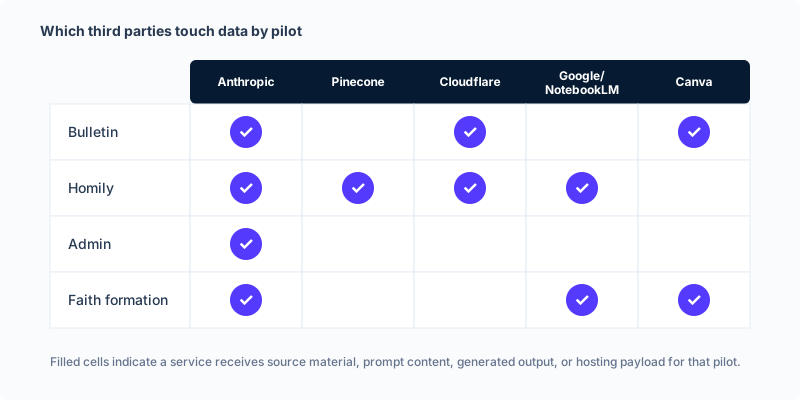
Each row is a candidate parish pilot; each column is a third party that would receive parish data under that pilot's flow.
Memory: the brain
Every meaningful conversation gets summarized and stored, so the next one starts informed.
Memory in the lab is a searchable archive of past sessions, plus Juan's personal Obsidian notes indexed alongside. When a new session starts and the topic touches anything the lab has worked on before, a recall step quietly fetches the relevant summaries and brings them into context. When the session ends and is wrapped up, its own summary gets written back to the same archive — so the archive grows with use.
The archive distinguishes between recent activity (last 30 days, queried first) and an older tier where things go to live without being forgotten. Personal notes from Juan's Obsidian vault are kept in their own slice so they can be filtered separately. Nothing in the archive is shared with anyone — it lives in Juan's own Pinecone account, encrypted at rest, and is queried only by sessions Juan opens.
Drill-down: memory-config + a real recall result
memory-config.json (the file that wires the lab to the archive):
{
  "personal_index": "personal-memory",
  "embedding_model": "llama-text-embed-v2",
  "dimension": 1024,
  "namespaces": {
    "personal_memory": {
      "active": "recent",
      "archive": "archive",
      "active_window_days": 30
    },
    "obsidian_vault": {
      "default": "default"
    }
  },
  "knowledge_indexes": [
    {
      "name": "obsidian-vault",
      "topic": "your Obsidian vault notes (wiki, projects, reference, inbox)",
      "namespace": "default",
      "folder_filter_field": "folder"
    }
  ],
  "llp_indexes": [
    {
      "name": "polish-learning",
      "topic": "Polish language learning sessions — saved via LLP app Save Session button",
      "namespace": "sessions",
      "note": "Never queried by the general recall skill. Access via LLP app memory/route.ts only."
    }
  ]
}
A real recall query during the showcase build (asking the archive for past parish work, condensed):
Query: "parish communications AI workflow showcase explain my setup"
Top hit (score 0.40): session-2026-05-03-1543
  → "Scraped St. Patrick Parish article and built parish HTML presentation."
  → Mentioned: heavens-are-telling.html, NotebookLM podcast pending, Cinzel typography.
  → This single hit is what told the new session that Heavens Are Telling
already existed and could be used as a proof point.Knowledge: the wiki
A library of reference material the lab can quote from on demand, without anyone re-uploading it each session.
Knowledge differs from memory: memory is what the lab has done; knowledge is what it knows. The lab's knowledge library currently includes engineering principles borrowed from Andrej Karpathy (think before coding, simplicity first, surgical changes, goal-driven execution), a collection of 71 brand design systems used when building visual artifacts, transcripts of courses Juan has taken, and reference documentation for the tools the lab uses. None of this is private parish material — it's general-purpose knowledge that makes the lab's work better.
Adding a new knowledge source is a small, repeatable operation: a script ingests a folder of markdown or PDF files, embeds them, and uploads them to a dedicated Pinecone index. Once that's done, the lab can quote from those sources in any future session. For a parish pilot, this is how a year of homily PDFs would become searchable.
Drill-down: sample knowledge ingestion script + a design-system file
Ingestion pattern (simplified): the script chunks the source, embeds each chunk via the lab's embedding model, and upserts to Pinecone with metadata. A 200-page homily archive becomes ~600 chunks in a few minutes.
# Simplified — see ~/.claude/scripts/ingest_vault.sh for the real one
for file in input_dir/*.md; do
  chunks=$(chunk_markdown "$file")
  embeddings=$(embed_chunks "$chunks")
  upsert_to_pinecone "$embeddings" --index $INDEX --namespace default
done
A design-system file frontmatter (showing how a knowledge entry is structured):
---
name: Stripe
description: Fintech, clean, blue-tinted shadows, weight-300 typography
type: design-system
---
[full DESIGN.md content here — colors, typography rules, component guidelines]Tools & Skills: what the lab can call on
Tools reach the outside world (Gmail, Canva, Cloudflare). Skills are reusable procedures the lab follows internally (recall, wrap-up, brainstorming).
Tools are how the lab takes action beyond just talking. Each tool is a plugin that lets the lab do one kind of real-world thing: send a draft email through Gmail, generate a Canva graphic, deploy a web page through Cloudflare, search the web through Firecrawl, take notes from a meeting transcript, see the screen through computer-use. There are roughly five categories worth knowing about: data (Pinecone for memory and knowledge), communications (Gmail, Calendar, Slack), creative (Canva, NotebookLM, Hyperframes, Firecrawl), infrastructure (Cloudflare, Vercel, Supabase, gh CLI), and computer interaction (computer-use, browser automation). Each tool requires its own one-time setup with Juan's account credentials.
Skills are different. A skill isn't a tool — it's a written-down procedure the lab follows when it recognizes a particular kind of task. The recall skill, for instance, isn't a thing that touches the outside world; it's a set of instructions that tells the lab how to formulate a memory query, what scores to trust, when to fall back. Skills compose: when Juan asks to brainstorm something, that triggers the brainstorming skill, which at the right moment hands off to the writing-plans skill, which at the right moment hands off to executing-plans. Each skill is small (a few hundred words) and focused. The lab has a couple dozen of them, covering things like wrap-up, recall, brainstorming, writing-plans, design-md, graphify, notebooklm, and others.
This distinction matters because it explains how parish pilots actually get built. A bulletin drafting pilot uses the design-md skill (knowledge about brand styling), the recall skill (memory of past bulletins), and tools like Canva and Gmail — orchestrated by a brainstorming or writing-plans skill on a fresh request.
Drill-down: how a tool is wired (config snippet) and how a skill is structured (anatomy)
A tool config entry (from ~/.claude.json, simplified):
"mcpServers": {
  "claude-code-guide": {
    "command": "npx",
    "args": ["-y", "claude-code-ultimate-guide-mcp"]
  }
}
That's it — a name and a command. The lab discovers the tool's capabilities at startup. Cloudflare, Pinecone, Gmail, and the rest follow the same pattern with their own credentials.
A skill structure (simplified — see ~/.claude/skills/recall/SKILL.md for the real one):
---
name: recall
description: Semantic search across stored memories. Trigger when user asks "what did we decide about X".
---

# Recall Skill

## When to fire
- User asks about past conversations
- User says "what did we decide about..."

## Steps
1. Determine which index to query (personal vs knowledge)
2. Run search-records via Pinecone MCP
3. Format response with dates + source IDs

## Rules
- Always show the date
- Quote, don't paraphrase
- Acknowledge weak matches (< 0.65 score)Rules: how it behaves
Written instructions that shape every conversation, so the lab's judgment compounds rather than resets.
The lab's behavior is governed by three layers of written rules that load into every session before any work happens. Global rules (Karpathy's four engineering principles) apply to every conversation across every project. Project rules (a CLAUDE.md file living in each project's folder) apply only when the lab is working on that specific project — for instance, a parish project would have its own CLAUDE.md that says "never publish parishioner names without explicit approval" or "all bulletin drafts go through David before sending." Strategy (a strategy.md file) is a higher-level governance layer that records active focus areas, things to avoid, and recent strategic decisions.
The cascade order is: global rules load first, then project rules layer on top (and can override), then any user instruction in the current session takes precedence. This is why a project-level rule like "always run a privacy sweep before deploying to a parish URL" reliably applies even if Juan forgets to mention it in the prompt — it's already baked into the project's CLAUDE.md.
Drill-down: an example showing all three rule layers in one session
Global rule (Karpathy's first principle, abridged):
## 1. Think Before Coding
- State your assumptions explicitly. If uncertain, ask.
- If multiple interpretations exist, present them — don't pick silently.
- If something is unclear, stop. Name what's confusing. Ask.
Project rule (from the Kaelum Visio CLAUDE.md, the don't-do list):
## Don't-Do
- No new paid subscriptions without clear cost/benefit
- No academic AI theory dives — understand enough to use it well
- No work that doesn't map to a concrete project
Session instruction (your prompt in any given session) overrides both, when in conflict, with the lab surfacing the conflict explicitly rather than silently following.
The session loop, fully expanded
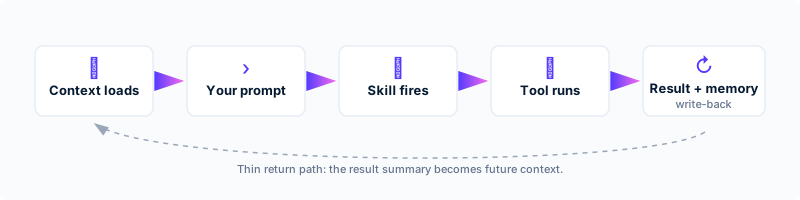
Every conversation flows through the same five phases, and the session itself becomes a memory the next one can use.
When you open a new conversation with the lab, here's what actually happens, in order: (1) context loads — global rules, project rules, and the most recently relevant memories all come into the session before you say anything. (2) Your prompt arrives, and the lab decides what kind of task it is. (3) If the task matches a known skill (brainstorming, recall, wrap-up, etc.), the skill fires — it's a script of how to approach this kind of work. (4) The skill may call tools (Gmail, Cloudflare, Pinecone) as it executes. (5) The result comes back to you, and when the conversation wraps, a summary of what was decided gets written back to memory.
Two things about this loop matter for parish use. First, the lab is not stateless between sessions — what was learned, decided, or drafted persists. Second, the lab doesn't just answer; it remembers having answered. A pilot like "homily archive search" benefits from this directly: every time someone asks "what did Father preach about during Lent 2024," the answer is grounded in stored material, and the session itself becomes a record of who asked what.
Drill-down: an annotated transcript of a real small session
# [user prompt arrives]
> "What did we decide about pricing last quarter?"

# [recall skill fires automatically because of "what did we decide"]
# [recall queries personal-memory index]
> Top hit (score 0.78): session-2025-12-14-1100
> → "Decided to drop the freemium tier; switch to single $19/mo plan."

# [lab formats response with date + source]
> "On 2025-12-14 you decided to drop the freemium tier and switch to a
> single $19/mo plan. Source: session-2025-12-14-1100."

# [conversation ends; wrap-up skill fires]
# [wrap-up writes a summary of THIS session back to personal-memory]
# [next session can recall this one too]Governance & ownership
The practical operational questions a parish IT person needs answered before any pilot ships.
Account ownership. Every account the lab uses (Cloudflare, GitHub, Pinecone, Anthropic, NotebookLM, Google Workspace) is currently held by Juan personally. For a parish pilot, accounts that touch parish data should either move to parish ownership (with Juan as a delegated administrator) or remain personal with a written succession plan. Either path is workable; the choice depends on how the parish prefers to handle vendor relationships.
Access & revocation. Anything published behind a Cloudflare Access policy can have email addresses added or removed in 30 seconds. The same goes for shared Gmail labels, Drive folders, and Canva projects. Anyone who's been given access and then leaves the parish or changes role should be removed; we'll build a written checklist for each pilot covering exactly who has access to what.
Data-never list. Some categories should never be uploaded to the lab under any circumstance: anything covered by the seal of confession, full parishioner financial records, sensitive diocesan personnel matters, anything in confidence from another person without their consent. This list lives in the project's CLAUDE.md so the lab itself will refuse if asked. The drill-down has the starter list and a printable checklist.
Approval workflow. Drafts produced by the lab are not auto-published. Anything that will be sent, posted, or printed needs a human approval step — usually David for communications-side artifacts, Father Paul for anything pastoral or theological. This isn't a constraint imposed by the lab; it's a workflow we configure on every pilot.
If Juan is unavailable. The lab runs on Juan's laptop and Juan's accounts. If Juan is unavailable for an extended period, ongoing pilots continue to serve whatever's already been published, but new work pauses. The drill-down sketches what a continuity plan would look like.
Drill-down: data-never checklist + access policy template + continuity sketch
Data-never list (starter, to refine with David & Father Paul):
- Content protected by the seal of confession
- Individual parishioner financial donations or stewardship records (aggregate trends are OK)
- Personnel matters, staff reviews, salary information
- Sealed sacramental records (baptism certificates, marriage records) — public-facing summaries OK with permission
- Personal information shared in pastoral counseling or spiritual direction
- Diocesan policy matters under review or in confidence
Access policy template (per pilot):
Pilot: [name]
URL: [hostname.pages.dev]
Access:
  - juan.alberto.ramos@icloud.com   (admin)
  - [david's email]                  (editor)
  - [fr.paul's email]                (reviewer, if applicable)
Removal procedure: dashboard.cloudflare.com → Zero Trust → Access →
  Applications → [pilot name] → Policies → edit Allow list → save
Continuity sketch (if Juan is unavailable):
- Already-published artifacts continue serving via Cloudflare
- Cloudflare Access policies can be edited by another administrator added to the account
- The personal-memory index is read-only without Juan's API keys, but published artifacts don't depend on it
- New pilot work pauses until Juan returns or hands off — a written handoff doc per pilot makes this faster
Cost & economics
Operator-time is the real cost. Platform spend is a small, mostly-free line item — but free infrastructure doesn't mean free implementation.
The lab itself runs on free tiers of almost everything: Cloudflare Pages, GitHub private repositories, Pinecone's serverless tier, NotebookLM, and Canva all have free allowances generous enough that a small parish pilot fits inside them. The one real subscription is Juan's Claude Code license, which is what makes the whole lab work. Net result: the platform bill for a small parish pilot is somewhere between $0/month and roughly $20-50/month if any specialty paid services get added.
The honest cost picture is different from the platform bill. Most of what makes a pilot succeed is operator-time: setting up the initial workflow (~5-15 hours per pilot), reviewing drafts and approving outputs (1-3 hours per week ongoing), and maintenance when something breaks or the workflow needs to evolve. For a single pilot, plan on roughly 15-25 hours of operator time in the first month and 2-5 hours per week thereafter, depending on how active the pilot is.
What this means in practice for a parish pilot: the financial commitment is small, and is almost entirely operator-time. Three rough tiers: lean (~$0/month platform, ~5 hr/month operator) suits a single low-volume pilot like a homily archive that gets queried a few times a week. Standard (~$20/month platform, ~15 hr/month operator) suits an active bulletin drafting pilot plus an FAQ helper. Generous (~$50/month platform, ~30 hr/month operator) suits multiple pilots running in parallel with frequent maintenance.
Drill-down: itemized subscriptions and operator-time estimates
Platform spend (all current as of 2026-05):
| Service | Current usage tier | Cost |
|---|---|---|
| Cloudflare Pages | Free (3 sites deployed, well under limits) | $0 |
| Cloudflare Zero Trust Access | Free for <50 users | $0 |
| GitHub private repos | Free unlimited | $0 |
| Pinecone Serverless | Free Starter tier (2 GB storage, 2M write units/mo, 1M read units/mo; well under) | $0 |
| NotebookLM | Free for personal use | $0 |
| Canva | Free tier (or Canva Pro if heavy graphics) | $0 or ~$15/mo |
| Anthropic Claude Code | Juan's existing subscription | (separate) |
| Specialty MCPs / occasional services | Variable | $0-30/mo |
Operator-time estimate, per pilot:
- Initial setup: 5-15 hours (depending on pilot complexity)
- Weekly review & approval: 1-3 hours
- Monthly maintenance: 2-4 hours
- First-month total: 15-25 hours
- Steady state (per pilot, after first month): 8-20 hours/month
What this means for the parish
A concrete decision table for picking the first pilot, plus a readiness checklist to run before kickoff.
You've now seen what the lab is, what it can't do, where data flows, what it costs, and how it would be governed. The remaining question is: which pilot first? The table below maps each candidate pilot to the lab components it would use, the privacy risk band, the cost band, the governance requirements, the next concrete action, and who'd own it. The four candidate pilots are the territories that emerged from the parish-lab-showcase; we can add or refine them as conversation continues.
| Pilot | Lab components | Risk | Cost band | Governance | Next action | Owner |
|---|---|---|---|---|---|---|
| Bulletin drafting | Memory of past bulletins, design-md, Canva, Gmail | Low (no parishioner data) | Lean | Review by David before send | Ingest 12 weeks of past bulletins, draft next Sunday's | David + Juan |
| Homily archive + Q&A | Memory (Pinecone), recall skill, NotebookLM | Low (Father's published material) | Lean to standard | Review by Father Paul before publication | Collect 1 year of homily transcripts/PDFs, build search demo | Father Paul + David + Juan |
| Admin & ops automation | wrap-up skill, Gmail, Calendar, scheduled tasks | Medium (touches internal scheduling) | Standard | Approval per workflow before automation activates | Pick one weekly staff meeting, auto-summarize for a month | David + parish admin |
| Faith formation & multilingual | NotebookLM, design-md, knowledge ingestion | Low (no parishioner data) | Lean | Review by Father Paul + catechesis lead | Build one bilingual reflection sheet for an upcoming feast day | Father Paul + catechesis lead |
Pilot readiness checklist
Before any pilot kicks off, run this checklist. If any item can't be answered yes, that's the blocker to address before starting.
- Minimum inputs available — do we have the source material (bulletins, homilies, etc.), accounts, and credentials needed?
- Responsible person identified — who owns this pilot day-to-day from the parish side?
- Review workflow agreed — who approves each output before it ships?
- Success metric defined — how do we know if this is working after 30 days?
- Failure stop conditions agreed — what would make us pause or stop the pilot?
- Expected ongoing maintenance — who handles updates, fixes, evolution, and at what cadence?
Pick the one that feels right to try first. No rush, no commitment. The smallest pilot that touches something already heavy in someone's week is usually the right answer.